
To update your credit card details, please head to Subscriptions > Enter payment details. Once the credit card information is saved, the card will be billed automatically and an invoice from our end will be sent to the billing contact on file by default.
Note : You can also notify us of any change in your credit card or other payment account information, either by updating your account or by emailing us at billing@acme.com.
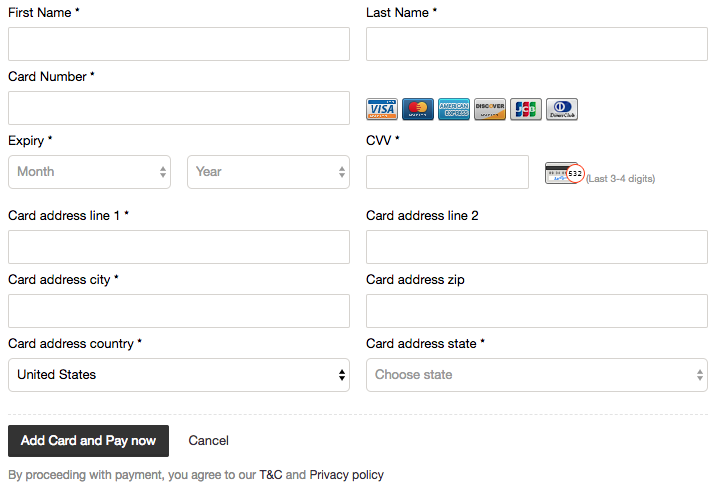
Note : You can also notify us of any change in your credit card or other payment account information, either by updating your account or by emailing us at billing@acme.com.
Troubleshooting if you can’t update your card or the payment page is stuck:
- Confirm the updated card is set as the primary payment method and is valid (not expired, with sufficient limit).
- Clear your browser cookies/cache, try a different browser or device, and disable any VPN, proxy, or browser extensions before retrying.
- If a payment failed but the amount was debited, check for confirmation emails from both our service and your payment provider, wait a few hours for the transaction to reflect, and verify with your bank or card issuer using the charge details.
- If the issue persists, contact Support and include your order number, date/time of the attempt, amount, payment method used, and the exact error message you saw so we can investigate.
- Confirm the updated card is set as the primary payment method and is valid (not expired, with sufficient limit).
- Clear your browser cookies/cache, try a different browser or device, and disable any VPN, proxy, or browser extensions before retrying.
- If a payment failed but the amount was debited, check for confirmation emails from both our service and your payment provider, wait a few hours for the transaction to reflect, and verify with your bank or card issuer using the charge details.
- If the issue persists, contact Support and include your order number, date/time of the attempt, amount, payment method used, and the exact error message you saw so we can investigate.
Was this article helpful?
That’s Great!
Thank you for your feedback
Sorry! We couldn't be helpful
Thank you for your feedback
Feedback sent
We appreciate your effort and will try to fix the article